Getting Started
This guide is for first-time users who want to go from zero setup to a real OpenAI request with inspectable context selection.
If you only remember one thing, remember this:
StatePlane helps you decide what context should be sent before you call a model.
What You Will Build in 10 Minutes
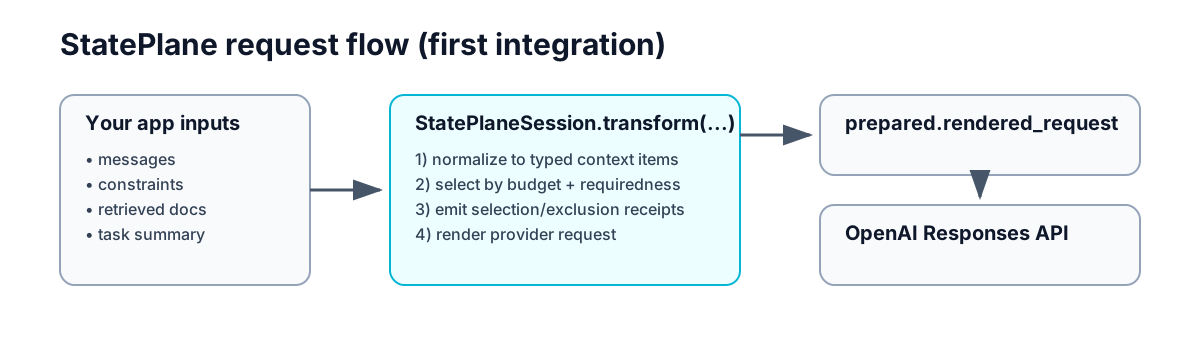
You will run one script that does all of this:
- Build a
StatePlaneSessionwith a budget and rules. - Provide transcript events plus optional retrieved snippets.
- Compile context and inspect what was selected/excluded.
- Render the exact OpenAI payload.
- Optionally execute a live
responses.create(...)call.
Flow diagram
Prerequisites
- Python 3.13
- OpenAI API key (optional, only for live call)
- This repository checked out locally
Step 1: Install and Run the Example
From the repository root:
python3.13 -m venv .venv-user
source .venv-user/bin/activate
python -m pip install --upgrade pip
python -m pip install -e packages/context_core -e packages/provider_openai -e packages/sdk
python examples/openai_context_demo/embedding_example.py
What you should see:
- candidate context item IDs
- selected IDs
- excluded IDs and reasons
- rendered OpenAI payload preview
If you also want a live model response:
Step 2: Understand the Minimal Integration Surface
The smallest useful integration looks like this:
from openai import OpenAI
from stateplane import RetrievedContextInput, StatePlaneSession, ToolCallInput, ToolResultInput

client = OpenAI()
session = StatePlaneSession(
    provider="openai",
    model="gpt-5.1",
    token_budget=130,
    response_reserve=40,
    instructions=["You are fixing one Python billing bug. Preserve the public API."],
    constraints=["Do not edit tests. Preserve the public API."],
)

messages = [
    {"role": "developer", "content": "Focus on the real billing bug. Ignore misleading docs."},
    {"role": "user", "content": "Make the failing test pass. Do not edit tests."},
    ToolCallInput(
        tool_name="run_pytest",
        call_id="call_pytest_1",
        arguments={"command": "pytest -q tests/test_billing.py::test_calculate_total"},
    ),
    ToolResultInput(
        tool_name="run_pytest",
        call_id="call_pytest_1",
        output={"command": "pytest", "exit_code": 1, "failure": "test_calculate_total"},
    ),
]

prepared = session.transform(
    task_summary="Fix one failing billing test without changing the public API.",
    messages=messages,
    retrieved_context=[
        RetrievedContextInput(
            title="src/billing.py",
            content="def calculate_total(items):\n    return sum(item.price for item in items)\n",
        ),
    ],
)

response = client.responses.create(
    **prepared.rendered_request.to_responses_create_kwargs(),
)
Step 3: Know Exactly What Comes Back
session.transform(...) returns a prepared object with four outputs you should inspect in order:
prepared.request– canonical request payload before provider rendering.prepared.compiled_context– selected context items.prepared.compilation_report– why each item was selected/excluded.prepared.rendered_request– final provider payload forresponses.create(...).
Inspection checklist
Use this checklist in development and CI:
- Is the latest user intent selected?
- Are hard constraints selected?
- Were irrelevant items excluded with
budget_exceededor similar reasons? - Does rendered output contain only selected context?
Step 4: Choose Your Next Tutorial
After this page, pick one path based on your goal:
- Learn parameter-by-parameter behavior → OpenAI Parameter Tutorial
- Build a stronger stateful coding-agent workflow → Structured Coding-Agent State with OpenAI
- Replay and diff run history → Replay and Diff a Coding-Agent Run
- Benchmark continuation-context quality offline → Coding-Continuation Evaluation
- Benchmark task outcomes on external coding tasks → External Coding Benchmarks
- Inspect the latest harness-evaluated SWE-bench snapshot → External Coding Benchmark Results
- Connect Codex hooks to repo-local StatePlane receipts → Codex Hooks Integration
- Follow a complete first-day onboarding path → First-Day Tutorial
Common Pitfalls
"Why is my context missing from the model call?"
Most commonly:
- your context exceeded the prompt budget
- your item was optional while required items consumed budget first
- you passed data in the wrong bucket (for example, transcript vs retrieved context)
Check prepared.compilation_report first.
"Can I skip StatePlaneSession and call lower-level APIs?"
Yes, but that is advanced usage. Start with StatePlaneSession.transform(...) unless you need exact
manual control.
"Does this already include a full tool/file-editing loop?"
No. Current value is compile + receipts + provider request preparation for one boundary.
Optional Notebook Path
If you prefer a notebook walkthrough, use:
examples/notebooks/openai_context_demo.ipynb