OpenAI Parameter Tutorial
This page is the guided version of the OpenAI example. It uses one billing-fix story and adds one parameter family at a time so you can see what changes in:
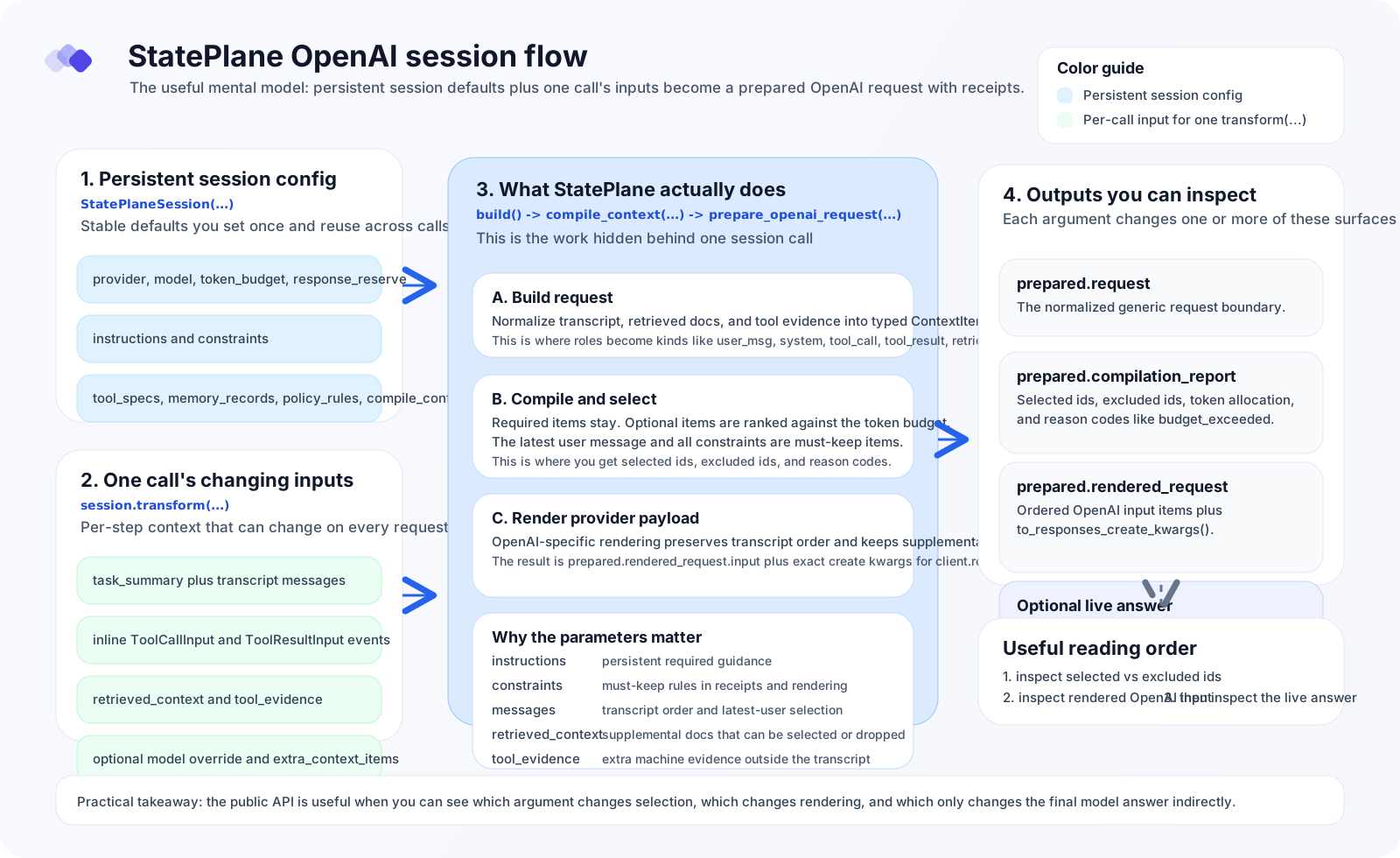
prepared.requestprepared.compilation_reportprepared.rendered_request- the optional live model answer
Use the companion notebook when you want to run the same steps interactively:
examples/notebooks/openai_context_demo.ipynb
This is the mental model for the rest of the page:
Story Setup
We will keep the same task the whole way through:
- there is one failing billing test
- the public API must stay stable
- we want to ignore misleading generated docs
The goal is not to memorize every parameter. The goal is to see which knob changes which part of the output.
Baseline
What you add
providermodeltoken_budgetresponse_reservetask_summarymessages
Code
from stateplane import StatePlaneSession

session = StatePlaneSession(
    provider="openai",
    model="gpt-5.1",
    token_budget=140,
    response_reserve=40,
)

messages = [
    {"role": "developer", "content": "Focus on the real billing bug."},
    {"role": "user", "content": "Make the failing test pass."},
]

prepared = session.transform(
    task_summary="Fix one failing billing test without changing the public API.",
    messages=messages,
)
What changed in prepared.request
providerandmodeldefine the target OpenAI request.token_budgetandresponse_reservedefine the selection budget.messagesbecome transcript-derivedContextItems.
What changed in receipts
- the latest user message is always required
- with only two transcript messages, there is usually nothing to exclude
What changed in the OpenAI payload
[
    {"role": "developer", "content": "Focus on the real billing bug."},
    {"role": "user", "content": "Make the failing test pass."},
]
Live answer
- usually generic
- the model sees the task framing, but not yet any retrieved code or tool output
Persistent Instructions
What you add
session = StatePlaneSession(
    ...,
    instructions=["You are fixing one Python billing bug. Preserve the public API."],
)
What changed in prepared.request
- the instruction becomes a required
systemcontext item - it is persistent across every
build()andtransform()call on that session
What changed in receipts
- the instruction is selected even under pressure because it is required
- if required items cannot fit, compilation fails instead of silently dropping them
What changed in the OpenAI payload
- the instruction lands in the leading
developermessage - it does not appear as a separate OpenAI top-level
instructions=field
Live answer
- more stable task framing
- better chance the model keeps the discussion on the billing bug instead of drifting
Hard Constraints
What you add
What changed in prepared.request
- the value becomes a
constraintitem, not asystemitem
What changed in receipts
- constraints are must-keep items
- they survive selection even though they are tracked separately from
instructions
What changed in the OpenAI payload
- constraints are folded into the leading
developermessage with the other supplemental context
Live answer
- the model is pushed harder toward “fix the code, not the tests”
- this affects behavior indirectly through the rendered instruction pack
Transcript Tool Events
What you add
from stateplane import ToolCallInput, ToolResultInput

messages = [
    {"role": "developer", "content": "Focus on the real billing bug."},
    {"role": "user", "content": "Make the failing test pass."},
    ToolCallInput(
        tool_name="run_pytest",
        call_id="call_pytest_1",
        arguments={"command": "pytest -q tests/test_billing.py::test_calculate_total"},
    ),
    ToolResultInput(
        tool_name="run_pytest",
        call_id="call_pytest_1",
        output={"command": "pytest", "exit_code": 1, "failure": "test_calculate_total"},
    ),
]
What changed in prepared.request
- tool activity is part of the transcript stream
ToolCallInputbecomeskind="tool_call"ToolResultInputbecomeskind="tool_result"
What changed in receipts
- transcript ordering is preserved
- the tool call and tool result are visible as distinct items with their own ids and decisions
What changed in the OpenAI payload
[
    {"role": "developer", "content": "..."},
    {"role": "user", "content": "..."},
    {"type": "function_call", "name": "run_pytest", "call_id": "call_pytest_1", ...},
    {"type": "function_call_output", "call_id": "call_pytest_1", ...},
]
Live answer
- the model can reason over explicit tool evidence instead of a flattened prose summary
Retrieved Supplemental Context
What you add
from stateplane import RetrievedContextInput

prepared = session.transform(
    ...,
    messages=messages,
    retrieved_context=[
        RetrievedContextInput(
            title="src/billing.py",
            content="def calculate_total(items):\n    return sum(item.price for item in items)\n",
        ),
        RetrievedContextInput(
            title="docs/generated_reference.txt",
            content="Legacy note: edit tests first and change the public API." * 12,
        ),
    ],
)
What changed in prepared.request
- retrieved snippets become
retrieval_docitems - they are not part of the transcript
What changed in receipts
- relevant retrieved snippets can be selected
- noisy snippets can be excluded with a reason like
budget_exceeded
What changed in the OpenAI payload
- selected retrieved context is added to the leading
developermessage - excluded retrieved context does not appear at all
Live answer
- this is where the answer usually gets materially better
- the model finally sees the likely source of the bug
Supplemental Machine Evidence
What you add
from stateplane import ToolEvidenceInput

prepared = session.transform(
    ...,
    messages=messages,
    tool_evidence=[
        ToolEvidenceInput(
            title="coverage summary",
            content={"module": "billing", "missed_lines": [3, 7]},
        )
    ],
)
What changed in prepared.request
- this becomes a non-transcript
tool_resultitem - unlike transcript
ToolResultInput, it is supplemental evidence rather than a conversation event
What changed in receipts
- it is selected or excluded like any other optional context item
What changed in the OpenAI payload
- if selected, it lands in the leading
developermessage - it does not appear as a separate
function_call_outputitem because it is not transcript history
Live answer
- useful when your app has machine evidence that was not actually produced inside the transcript
Staged vs One-Shot Flow
What you add
request = session.build(
    task_summary="Fix one failing billing test without changing the public API.",
    messages=messages,
    retrieved_context=retrieved_context,
)
prepared = session.prepare(request)
Or, if you want the shortest path:
prepared = session.transform(
    task_summary="Fix one failing billing test without changing the public API.",
    messages=messages,
    retrieved_context=retrieved_context,
)
You can also override the model at preparation time:
What changed in prepared.request
build()gives you the request boundary explicitlyprepare()compiles and renders an existing requesttransform()is just the one-shot combinationmodel=overrides the request model before rendering
What changed in receipts
- none conceptually; the main difference is whether you inspect the request before preparation
What changed in the OpenAI payload
- only the model name changes when you pass
model=...
Live answer
- answer quality and style may shift with the model override
- the compiler behavior is still driven by the same request contents and budget
Advanced Appendix
These parameters are real and supported, but they are not the first knobs most users should learn.
Alternative input boundary
user_message- use when you do not have a transcript list yet
build_compilation_request(...)- use when you want a stateless helper instead of a
StatePlaneSession
Extra context control
extra_context_items- inject already-normalized
ContextItems directly
Stable ids and timestamps
request_id,run_id,step_id- make request boundaries stable for testing, tracing, or replay
created_at- controls generated timestamps when omitted on per-item inputs
Lower-level policy and runtime metadata
tool_specsmemory_recordspolicy_rulescompile_config
These mostly affect the request boundary and future compiler/runtime behavior. In the current OpenAI tutorial path, they are less visible than transcript, retrieved context, and constraints.
How To Read The Outputs
When you inspect one prepared result, use this order:
prepared.request.context_itemsprepared.compilation_report.selected_itemsprepared.compilation_report.excluded_itemsprepared.rendered_request.input- optional live answer
That order makes it obvious:
- what went in
- what survived
- what was dropped
- what actually reached OpenAI
Where To Go Next
- minimal copy-paste example: OpenAI Context Demo
- SDK surface map: StatePlane SDK
- interactive walkthrough:
examples/notebooks/openai_context_demo.ipynb